
Why Healthcare Software Demos Fail in Clinical Workflows
- August 7, 2026
- Posted by: Rahul Varshneya
- Categories:
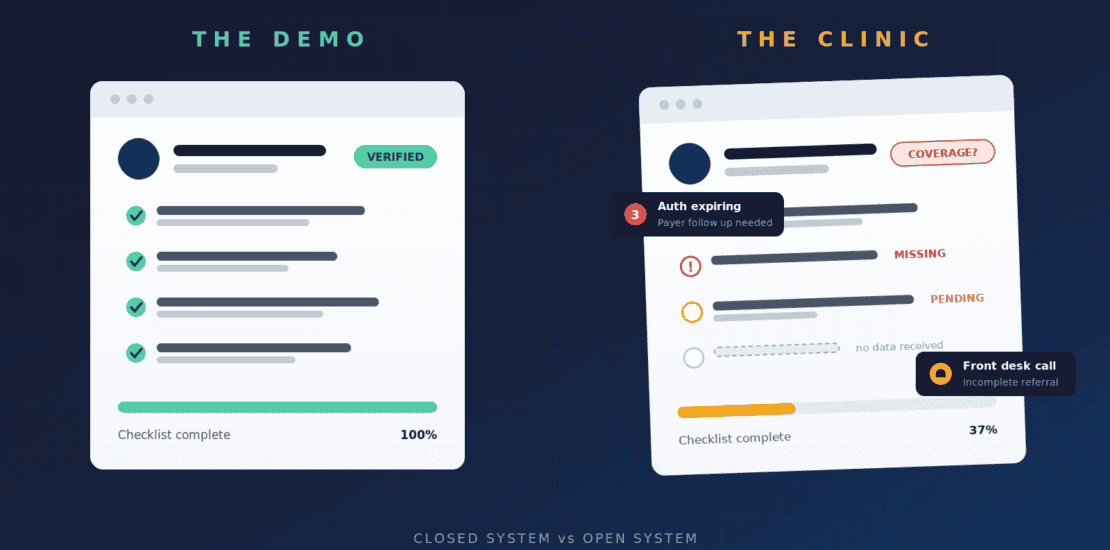
A healthcare software demo fails in clinical workflows because the demo tests the software against clean data and a rehearsed path, while a clinic runs on incomplete referrals, missing authorizations, and constant interruption. The software is not broken. It was specified against conditions that do not exist in practice. After 15 years building healthcare software exclusively at Arkenea, the pattern we see is consistent: when a tool that demoed well collapses in production, the fault sits in discovery, not in engineering.
Every clinician has lived some version of this story. A vendor comes in, the demo is impressive, the interface is clean, and the workflow on screen looks faster than whatever the practice is doing today. Leadership signs off. Then the software goes live, and within two weeks the staff has built workarounds, the front desk is keeping a parallel spreadsheet, and the tool that was supposed to save time is quietly costing it.
This article explains why that gap opens, what specifically breaks, and how you can stress test a demo so the failure surfaces before you sign rather than nine months after go live.
Why does healthcare software that works in a demo fail in clinical workflows?
Healthcare software demos fail in clinical workflows because a demo is a controlled performance and a clinic is an uncontrolled environment. The demo removes every variable that causes production failure: missing data, competing users, interruptions, exceptions, and payer behavior. Removing those variables is what makes the demo persuasive, and it is also what makes the demo uninformative about production.
A demo is a performance, not a test
A demo exists to show software succeeding. The data is clean, the patient record is complete, the insurance information is verified, and the person driving the demo knows precisely which path to click through. Nothing arrives late, nothing is missing, and nobody interrupts.
None of those conditions exist in a clinical environment. Dr. Patrick Kelly, PT, DPT, Co Founder and Chief Clinical Officer at Bridgepoint Therapies, put it better than I could:
“A demo is a closed system: controlled inputs, ideal state data, and a path chosen in advance. Real clinical work is open, unpredictable, and dynamic; a referral may be incomplete, authorization may be missing, and the patient in front of you may not match the script. Software that only proves itself in the controlled environment inevitably struggles when it encounters the real one.”
Dr. Patrick Kelly, PT, DPT, Co Founder and Chief Clinical Officer, Bridgepoint Therapies
That distinction between a closed system and an open one is the entire problem. Software evaluated in closed conditions carries no evidence about how it behaves in open ones. The demo answers the question of whether the software works. It says nothing about whether it works here, with this staff, this payer mix, and this patient population.
What conditions does a demo remove that a clinic cannot?
A demo removes six conditions that a clinic faces every day, and each one is a common failure point after go live. Naming them turns a vague unease about demos into a specific list you can test against. The table below maps what the demo assumes to what your operation actually delivers.
| Condition | What the demo assumes | What your clinic delivers | Failure mode when the gap is unhandled |
|---|---|---|---|
| Data completeness | Every required field is populated and validated | Referrals without documentation, unverified coverage, mismatched identifiers | Staff enter placeholder values or abandon the system for that task |
| User attention | One person, one uninterrupted session | Documentation interrupted mid note, billing work resumed 20 minutes later | Lost state, silent timeouts, duplicate records |
| Path variety | The standard path, chosen in advance | Denials, retroactive eligibility changes, mid episode payer switches | Exception handling moves to email, fax, and spreadsheets |
| Concurrency | A single role viewing a single record | Front desk, clinician, biller, and manager touching the same record | Edit conflicts, unclear ownership, one role sabotaging adoption for another |
| Data sources | One system holds everything needed | Outside records, faxes, payer portals, labs, and a legacy system | Manual reentry and reconciliation work nobody scoped |
| Volume and tempo | A handful of records at conversational speed | Full schedules, batch billing runs, month end close | Latency and pagination problems that only appear at scale |
None of these are exotic. They are ordinary, predictable, and therefore designable. A vendor who cannot discuss them specifically has not watched their product in a working clinic.
What does a clinical workflow actually do to software?
Clinical environments stress software in four consistent ways: incomplete inputs, interruption, exception volume, and role conflict. These pressures are predictable, which means they can be designed for. Software that ignores any one of them will generate workarounds within weeks of launch.
Incomplete data is the default, not the exception
Referrals arrive without documentation. Authorizations lag behind scheduled visits. Patients show up with insurance cards that do not match what is on file.
Software that assumes complete inputs before a task can proceed forces staff to either falsify a field or abandon the system for that task, and both habits spread fast. The correct design pattern is a save state that tolerates missing data, flags what is outstanding, and routes the gap to whoever can close it. A hard stop that cannot be satisfied is not a data quality control. It is a workaround generator.
Interruptions define the tempo of clinical work
A clinician documenting a visit gets pulled away mid note. A biller working a denial takes a phone call and returns twenty minutes later. Software that loses state, times out without saving, or buries the return path punishes exactly the working conditions it will encounter every single day.
Session timeouts deserve particular attention because they sit at the intersection of usability and the HIPAA Security Rule. A short automatic logoff protects unattended workstations and destroys unsaved work at the same time. The resolution is draft persistence and fast reauthentication, not a longer timeout, and you should ask a vendor to demonstrate both.
Exceptions are routine, not edge cases
The demo shows the standard path because the standard path is where the software shines. A meaningful share of clinical and administrative work is exception handling: the denied claim, the retroactive eligibility change, the patient who switches payers mid episode. If handling the exception requires leaving the system, the system has failed at the moment it mattered most.
Regulation is now formalizing some of these exception paths, which raises the bar on what your software must handle natively. Under the CMS Interoperability and Prior Authorization final rule, impacted payers must send prior authorization decisions within 72 hours for expedited requests and seven calendar days for standard requests, and must give a specific reason for denials. Software that treats a denial as a dead end rather than a structured, resubmittable event is already behind the process it is meant to support.
Multiple roles touch the same record for different reasons
The front desk, the clinician, the biller, and the office manager each need a different view of the same patient, and each measures the software by their own tasks. A tool that delights one role while adding clicks for another gets adopted by one role and sabotaged by another.
This is why role based access control belongs in the demo rather than in the security appendix. Ask to see the same patient record rendered for four different roles, in sequence, and watch how much irrelevant information each role has to scroll past. Clicks that leadership never performs are the clicks that decide adoption.
How much of the workday does clinical software actually consume?
Clinical software consumes a large and measurable share of the workday, which is why small usability gaps compound into large ones. A study of 142 family medicine physicians published in the Annals of Family Medicine found that clinicians spent 355 minutes, or 5.9 hours, of an 11.4 hour workday in the electronic health record. Clerical and administrative tasks including documentation, order entry, billing and coding, and system security accounted for 157 minutes, or 44.2 percent, of that total.
Those figures reframe what a few extra clicks mean. A task performed 40 times a day that gains 15 seconds of friction costs a clinician roughly 10 minutes daily and about 40 hours a year. That arithmetic never appears in a demo, because a demo shows the task once.
Is a demo failure really a discovery failure?
Yes. When healthcare software collapses on contact with a clinical workflow, the collapse almost never traces back to bad engineering. It traces back to the specification, and the specification traces back to what was learned, or not learned, before anyone wrote a line of code.
Software gets built to match a document. If that document was assembled from assumptions, from a stakeholder interview with leadership but not with the front desk, or from a template of what practice management tools usually include, then the software will faithfully encode those gaps. The engineering can be flawless and the product will still fail, because it is a precise answer to the wrong question.
This is why, after 15 years as a medical software development company, we refuse to skip discovery at Arkenea, even when a prospect arrives with a spec in hand. Increasingly those specs are generated by AI tools, and they read as complete while quietly assuming the closed system Patrick described: ideal data, cooperative payers, uninterrupted users. Discovery is where you find out what the open system actually looks like, and it is far cheaper to find out in week three than in month nine.
Why do AI generated specifications make this worse?
AI generated specifications make the problem worse because they produce fluent, complete looking documents from generic patterns rather than from your operation. A generated spec will describe a scheduling module, an eligibility check, and a claims submission flow in confident detail. What it cannot know is that your largest payer requires a portal upload your clearinghouse does not support, or that two of your eight locations run a different intake process.
Treat a generated spec as a starting outline and not as a requirements document. The test is simple: for every workflow the document describes, ask which specific person at your organization was observed performing it. If the answer is nobody, the document records assumptions rather than requirements.
How do you stress test a healthcare software demo before you buy?
You stress test a healthcare software demo by recreating the conditions the demo is designed to hide: broken data, real users, exception paths, and concurrent roles. Insist on driving the session with your own scenarios rather than watching a scripted tour. Vendors who have run their product in working clinics will welcome this. Vendors who have not will resist it, and that resistance is itself the finding.
Bring your ugliest data
Ask the vendor to run the demo with an incomplete referral, a patient with lapsed coverage, and a denial that needs reworking. Watch what the software does when the required field cannot be filled. The answer tells you more than any feature list.
Use deidentified copies of records that actually caused trouble in the last quarter rather than invented examples. Your worst records encode the specific messiness of your payer mix and referral sources. Invented test cases tend to be tidier than reality even when you are trying to make them ugly.
Put the actual users in the room
The people evaluating the software should include the people who will live in it eight hours a day, not only the people approving the invoice. The front desk will spot the fatal three extra clicks that leadership never sees.
Give each role a task to complete personally rather than watching the vendor perform it. Time the tasks. A biller who needs four minutes to rework a denial in the current system and seven in the new one has given you a clearer verdict than any scorecard.
Ask where the workarounds will form
Every system produces workarounds somewhere. A vendor or development partner who can tell you where theirs tend to appear has watched their product in production. One who insists there are none has not looked.
Follow up by asking what those clients did about it, and whether the fix was configuration, training, or a product change. The answer reveals how the vendor treats field feedback. A vendor whose fixes are always training has decided the product is finished.
Interrogate the exception paths, not the happy path
The happy path is table stakes. Ask what happens when the authorization is missing, when the payer changes, when two staff members edit the same record. The quality of those answers predicts the adoption curve.
Ask for the exception to be performed on screen rather than described. There is a large difference between a vendor saying denials are supported and a vendor showing you a denial arriving, being routed, being annotated, and being resubmitted with an audit trail intact.
A 90 minute demo stress test agenda you can send to vendors
Send this agenda before the meeting so the vendor arrives prepared and cannot improvise around it. The structure matters more than the exact timing. What you are buying is evidence about the open system, and evidence requires that you control the inputs.
- Minutes 0 to 10: vendor states which of your submitted scenarios they cannot support, before any screen is shared.
- Minutes 10 to 25: intake of your incomplete referral, using your deidentified record, driven by your front desk staff member.
- Minutes 25 to 40: clinical documentation interrupted at the halfway point, with the session left idle past the timeout, then resumed.
- Minutes 40 to 55: a denial worked end to end, including resubmission and the audit record that results.
- Minutes 55 to 70: the same patient record opened simultaneously by two roles, with both attempting an edit.
- Minutes 70 to 80: integration walkthrough covering how outside data enters the system and how your data leaves it.
- Minutes 80 to 90: the vendor names three clients where adoption was difficult and what changed as a result.
Score each segment on whether the task completed inside the system, how many steps it took, and whether the outcome was auditable. A tool that completes six of seven segments cleanly is a serious candidate. A tool that requires you to leave the system twice has told you where your future spreadsheets will live.
What integration questions does a healthcare software demo never answer?
A demo almost never answers how data enters and leaves the system, which is where a large share of production failure originates. Integration work is invisible on screen, expensive to retrofit, and easy for a vendor to describe in terms that sound settled when they are not. These are the questions worth asking in writing.
- Which interface standard does the integration use: HL7 v2 messaging, HL7 FHIR R4, a proprietary API, or file transfer on a schedule
- Is the connection read only, or can the system write discrete data back into your EHR, and which fields specifically
- How does the system authenticate against your EHR, and does it support SMART on FHIR app launch and single sign on
- Which USCDI data classes are supported, and what happens to elements outside that set
- What is the refresh interval, and what happens to records that change between refreshes
- Who owns the interface engine work, who pays for it, and what is the estimated timeline in weeks
- What happens on the day your EHR vendor upgrades a version, and who is responsible for revalidation
- Can you export your complete data set in a documented, nonproprietary format on demand and at termination
National data suggests why the write back question matters more than most buyers expect. ONC reporting shows that 92 percent of routinely interoperable hospitals had necessary clinical information available from external providers at the point of care, compared with only 33 percent of hospitals that were not routinely interoperable. The same analysis found that only 8 percent of family medicine physicians reported it was very easy to use clinical information from clinicians using a different EHR developer.
Read those two numbers together and the implication is direct. Integration that technically exists is not the same as integration that delivers usable information where the work happens. A demo that shows data appearing in a panel has proved the first and told you nothing about the second.
How should HIPAA compliance be tested in a demo rather than asserted?
HIPAA compliance should be tested by asking the vendor to perform security behaviors on screen, because HIPAA is an architecture and not a badge. Any vendor will say they are HIPAA compliant. The useful question is what the software does, mechanically, when a compliance obligation meets a clinical workflow.
- Ask to see the audit log entry generated by the exact action just performed, including who, what, and when
- Ask what happens when a user tries to access a record outside their assigned role or facility
- Ask how protected health information is handled in error messages, notifications, exports, and support tickets
- Ask whether the vendor will sign a Business Associate Agreement without negotiation, and request the standard text
- Ask which subcontractors and cloud services touch protected health information, and whether each has its own agreement in place
- Ask for the most recent SOC 2 Type II report and read the exceptions section rather than the cover letter
- Ask how the automatic logoff interval is configured and whether unsaved work survives it
- Ask how patient records are deleted, retained, and exported when a patient or a contract ends
The last two items connect compliance back to workflow, which is where compliance usually fails in practice. Controls that make ordinary work impossible get circumvented by staff who are trying to see patients. A control that is bypassed daily protects nobody, no matter how well it documents.
Should you buy off the shelf healthcare software or build custom?
Buy off the shelf when your workflow is close to the industry standard and your differentiation lies elsewhere. Build custom when your workflow is the thing that makes your organization work, or when exception handling in your specialty is the bulk of the job. Most failures come from picking the wrong side of that line, not from executing the chosen side badly.
The ranges in the table below reflect what Arkenea typically sees across engagements with practices, provider networks, and health technology companies in the United States. They vary considerably with integration scope, specialty, and regulatory surface, so treat them as planning brackets rather than quotes.
| Dimension | Off the shelf platform | Configured platform plus custom modules | Custom build |
|---|---|---|---|
| Time to first production use | 4-12 weeks | 3-6 months | 6-12 months for a first release |
| Typical first year cost profile | Per user subscription plus implementation fee | Subscription plus 40,000 to 200,000 dollars of custom work | 150,000 to 600,000 dollars, then a maintenance retainer |
| Workflow fit | You adapt to the software | Core is fixed, edges are yours | Software adapts to you |
| Exception handling | Whatever the vendor shipped | Extendable where the platform exposes hooks | Designed against your actual exception volume |
| Integration control | Vendor roadmap dependent | Partial, limited by platform APIs | Full, including write back and interface engine choices |
| Ongoing burden | Low engineering, high process compromise | Moderate on both | Requires a maintenance owner and budget |
| Best fit when | Standard workflow, small team, speed matters most | Standard core with two or three genuinely unusual processes | Workflow is the differentiator, or multisite scale is planned |
Hamilton Physical Therapy, a practice with eight locations across Montana, illustrates the case for the third column. They were running a widely used off the shelf physical therapy EHR, which means it had demoed successfully to a great many practices including theirs. Complex workflows and a tedious interface still pushed documentation time up and patient time down.
We analyzed the actual user flows in the practice before designing anything, then built a custom EHR that reduced physician documentation time and connected to their existing billing software rather than replacing it. The instructive detail is not that custom won. It is that a product with a strong market position and a persuasive demo was still a poor fit for a specific eight location PT operation, and no amount of training would have closed that gap.
What contract and pilot terms protect you when a demo oversells?
Written acceptance criteria protect you where a demo cannot, because they convert the vendor’s claims into obligations. The demo is a sales artifact and carries no weight after signature. The scenarios you tested should appear in the agreement as conditions, in the same specific language you used to test them.
- Name the exact scenarios from your stress test as acceptance criteria, with a stated pass condition for each
- Define a conditional pilot period, commonly 60 to 90 days, with a defined exit and a prorated refund if criteria are unmet
- Specify integration deliverables by standard and by field, not as a general commitment to interoperate
- Require a documented data export in a nonproprietary format, available on demand and at termination, at no additional charge
- Set a training allocation in hours per role rather than a lump sum for the organization
- Cap the annual price escalator and define what triggers a tier change as your headcount grows
- Require named support response times for clinical blocking issues, distinct from general support
- Record which product roadmap items were promised verbally, with dates, in an appendix both parties sign
Training deserves a specific number because underfunding it is common and quiet. KLAS Arch Collaborative research reports a 90 point difference in Net EHR Experience Score between clinicians who strongly agree their initial EHR training prepared them well and those who strongly disagree, and suggests that 5-8 total hours of initial training and 3-5 hours of ongoing training per year sets clinicians up for success. If your implementation plan allocates two hours and a recorded video, the adoption problem is already scheduled.
What early signals show healthcare software is failing after go live?
The earliest reliable signal of failure is the appearance of a parallel record, usually a spreadsheet, a notebook, or a shared document that duplicates something the software was bought to hold. Adoption failure is visible within 30 days if you know what to watch. Waiting for a quarterly satisfaction survey means acting a quarter late.
| Signal | How to measure it | Check by | What it indicates |
|---|---|---|---|
| Parallel records | Walk the front desk and billing area and count shadow spreadsheets and paper logs | Day 14 | A workflow the software cannot complete |
| Task abandonment | Rate of records started and left incomplete past 24 hours | Day 30 | A hard stop staff cannot satisfy |
| After hours usage | Share of documentation time logged outside clinic hours | Day 45 | Work displaced rather than reduced |
| Support ticket clustering | Tickets grouped by screen rather than by user | Day 30 | A specific design defect, not a training gap |
| Exception routing | Share of denials and authorization gaps handled outside the system | Day 60 | Exception paths were never built |
| Role divergence | Satisfaction scored separately by front desk, clinician, and biller | Day 60 | The tool optimizes one role at another’s expense |
| Data quality drift | Frequency of placeholder values in required fields | Day 90 | Staff are satisfying validation rather than recording truth |
Treat clustering by screen as the most actionable of these. When 30 tickets name the same screen and 30 different users, the screen is the problem. When 30 tickets name 30 screens and the same three users, you have a training issue, and the response should differ accordingly.
What does software built for the open system look like?
Software built for the open system treats exceptions, roles, and interruptions as primary requirements rather than as later additions. That shows up in concrete design decisions you can inspect: how state is preserved, how gaps are routed, how permissions differ by role, and what happens when the network drops. Two Arkenea engagements make the contrast tangible.
Arc Care is a utilization management and claims review platform where the exception is the product rather than an afterthought. Prior authorization work runs on missing information, turnaround deadlines, and reversals, so we built automatic turnaround time calculation, round robin nurse assignment, and a request for information flow that extends the deadline, generates a structured letter, and auto closes the case if the provider misses the window. A nurse who needs more information stays inside the system, and the audit trail stays intact.
ORLink addresses the role conflict and interruption problems in a surgical setting. Surgeons, nurses, OR directors, and hospital administrators each need a different view of the same procedure, and operating room environments are not places where connectivity can be assumed. The platform uses role based access with defined capabilities for initiating, editing, validating, and publishing procedures, with preference cards available offline.
Neither of those decisions demos impressively. Role based views look like extra configuration screens in a sales meeting, and offline support looks like nothing at all until the network drops during a case. Both determine whether the software survives a Tuesday.
The pattern behind the pattern
Healthcare software fails in clinical workflows when it is built or bought against a simplified model of clinical work. The demo is just where that simplification is most visible. The fix is not better demos. It is a more honest account of the workflow before the software exists, which is a scoping discipline rather than a sales discipline.
The practices and founders who get this right share a habit: they treat the messy parts of their operation as requirements rather than embarrassments. The incomplete referral is not an edge case to apologize for. It is Tuesday. Software specified around Tuesday, rather than around the demo, is software that staff will still be using a year after launch.
Frequently asked questions about healthcare software demo failures
How long after go live does healthcare software usually fail?
Adoption failure is typically visible within 14 to 30 days, when staff begin building parallel spreadsheets or paper logs for tasks the software cannot complete. The formal decision to replace the system usually comes 12-18 months later, long after the workarounds hardened into routine. Watch for the shadow record, not the survey.
Can better training fix software that fails in clinical workflows?
Training fixes unfamiliarity, not misfit. If support tickets cluster around one screen across many different users, the screen is the defect and no amount of training will resolve it. Training does matter independently: KLAS Arch Collaborative research links well prepared clinicians to dramatically higher EHR experience scores. Diagnose which problem you have first.
What should you bring to a healthcare software demo?
Bring three deidentified records that caused real trouble last quarter, including an incomplete referral, a patient with lapsed coverage, and a denial needing rework. Bring the front desk staff member, a clinician, and a biller who will use the system daily. Bring a written agenda the vendor receives in advance.
Is custom healthcare software always more expensive than off the shelf?
Not over a full ownership period. Off the shelf carries lower upfront cost and higher process compromise, which surfaces as documentation time, workaround labor, and eventual replacement. Custom carries higher upfront cost and an ongoing maintenance obligation. Compare total cost across five years including staff time, not license fees alone.
What integration standard should healthcare software support?
HL7 FHIR R4 is the current baseline for modern exchange, with SMART on FHIR for app launch and single sign on, and HL7 v2 messaging still common for lab and ADT feeds. Ask specifically whether the connection writes discrete data back to your EHR or only reads, since read only integration leaves duplicate entry in place.
How do you know whether a vendor has run their product in a working clinic?
Ask where workarounds tend to form among their existing clients and what the company did in response. Vendors with production experience answer specifically and name the screens involved. Vendors without it deny that workarounds exist or reframe every issue as a training gap. The specificity of the answer is the signal.
Should leadership or end users make the final software decision?
Both, with different weights. Leadership should decide on cost, contract terms, security posture, and strategic fit. End users should hold a decisive vote on daily task completion, since they absorb every extra click for years. A tool that leadership loves and the front desk resents will accumulate workarounds regardless of the contract.
What is the single most useful question to ask in a software demo?
Ask the vendor to show you what happens when a required field cannot be filled. The answer exposes whether the product was designed for complete data or for the incomplete data clinics actually receive. Watch whether staff would be forced to enter a placeholder value or leave the system entirely.
